

Quick Summary
- Deel lets companies hire, manage and pay contractors and employees through contractor management, EOR, US Payroll and Global Payroll products.
- The platform operates across 150+ countries; Deel publishes EOR and Global Payroll coverage in 130+ countries.
- Workers do not pay a monthly subscription simply to receive funds, but withdrawal, payment-provider and currency-conversion charges may apply.
- Withdrawal options depend on location and account type and may include bank transfer, Wise, PayPal, Payoneer, Revolut, Coinbase and digital-currency transfer.
Last reviewed: June 22, 2026. Product availability, fees and withdrawal methods can change by country and account type.
How Deel works
Deel is a workforce platform for companies managing employees and independent contractors in multiple countries. Businesses can use it for compliant contractor agreements and payments, Employer of Record hiring, US payroll, multi-country payroll and related HR workflows. Contractors and employees use their own accounts to sign contracts, submit required information, view payment details and withdraw available funds.
This guide explains the practical workflow for opening an account, paying or receiving money, using the Deel Wallet, comparing withdrawal options and understanding the difference between contractor, EOR and US Payroll services.
How to Sign Up on Deel (Step-by-Step)
Getting started with Deel is quick and easy. Here’s how to register and begin using the platform, whether you’re a freelancer or a company.
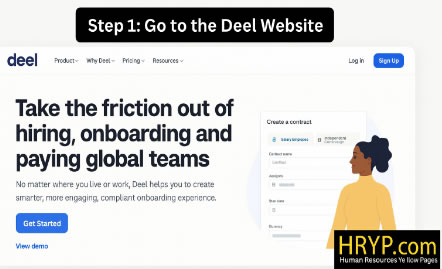
Step 1: Go to the Deel Website
👉 Visit deel.com and click “Sign Up” in the top-right corner.
Step 2: Choose Your Role
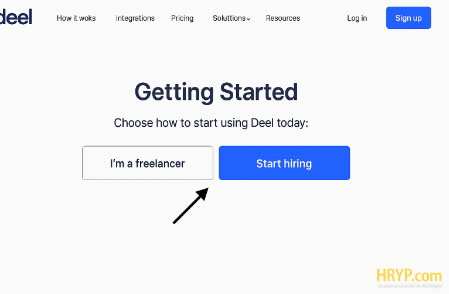
You’ll be asked to choose between:
- I want to hire (for companies)
- I want to get paid (for freelancers/contractors)
Step 3: Fill in Your Details
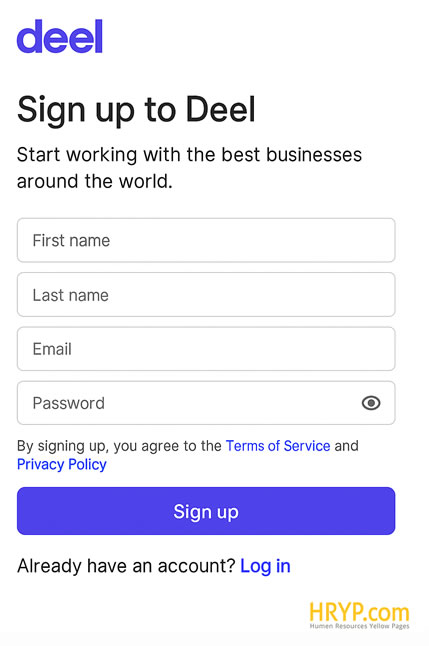
- Enter your name, email, and password
- Accept terms and conditions
- Click Create Account
Step 4: Verify Your Email
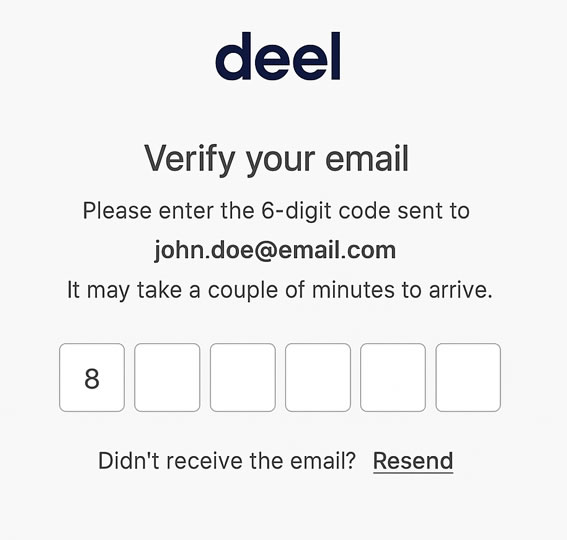
You’ll receive an email from Deel. Click the verification link to activate your account.
Step 5: Complete Your Profile
Once inside:
- Set your location and currency
- Add your job role or business type
- Start creating a contract or add payout method (based on your role)
How to Pay Someone Through Deel
Paying freelancers and contractors on Deel is fast and compliant. Here’s how it works:
- Create a company account on Deel.
- Invite the freelancer by email and choose the contract type (e.g., Fixed Rate, Milestone, Pay As You Go).
- Set payment terms (frequency, amount, currency).
- Fund the contract using a preferred method (bank, card, etc.).
- Payments are processed automatically according to the agreed schedule.
✅ Tip: Deel handles local tax compliance and generates invoices automatically.
How to Receive Payments in Deel
If you’re a freelancer or contractor:
- Sign up for free on Deel.
- Add your personal info and tax documents.
- Connect your withdrawal method (bank transfer, Wise, PayPal, Payoneer, Crypto).
- Once your client funds the contract, you’ll get paid automatically on the scheduled date.
👉 You can also set your preferred payout currency.

How to Use the Deel Wallet in 2026
The Deel Wallet is the balance and withdrawal area available to eligible workers after a client payment has been processed. It lets users review available funds, select a supported withdrawal method and, where available, convert or transfer money in another currency. It should not be described as a personal bank account or investment account.
What the Deel Wallet lets you do
| Wallet function | What to know |
|---|---|
| View available balances | See payments that have reached your Deel account and are available for withdrawal. |
| Select a withdrawal method | Options can include bank transfer, Deel Card, instant card transfer, Wise, PayPal, Payoneer, Revolut, Coinbase or digital-currency transfer. |
| Review estimated charges | The applicable withdrawal, transaction and foreign-exchange charges depend on the method, currency and destination. |
| Track withdrawals | The dashboard displays the selected method and the status of the transfer. |
| Use digital currency where eligible | Coinbase and digital-currency transfer may appear as withdrawal options for eligible users and locations. |
How to withdraw money
- Sign in to your Deel account.
- Open the finance, wallet or withdrawal area shown for your account type.
- Add or select an available withdrawal method.
- Review the destination, currency, estimated delivery time and charges displayed before confirming.
- Submit the withdrawal and monitor its status in the dashboard.
Important: not every method is available in every country. Deel and the receiving provider may apply separate transaction, withdrawal or currency-conversion charges.
Can you receive Deel payments in crypto?
Eligible contractors may be able to withdraw funds through Coinbase or a supported digital-currency transfer method. Eligible US employees may also configure crypto payroll through Coinbase. This is different from assuming every Deel contract is paid directly in cryptocurrency, and availability can depend on country, worker type and provider eligibility.
Official sources reviewed: supported withdrawal methods, withdrawal FAQs, fees and minimums, and crypto payroll.
Is Deel Free to Use?
Contractors and employees do not pay a monthly Deel subscription simply to create a worker account or receive an approved payment. The hiring company pays for the Deel service it selects. Deel’s published contractor-management pricing starts at $49 per active contractor contract per month, while EOR, payroll and other products have separate pricing.
“Free to receive a payment” does not mean every transaction is free. Withdrawal-method fees, payment-provider charges, foreign-exchange costs and minimum withdrawal amounts can apply. Deel displays the relevant options and estimated charges before a withdrawal is confirmed.
Pricing note: reviewed June 22, 2026 using Deel’s official pricing and help documentation. Always verify the price shown for your account, country and product.
Is It Safe to Keep Money on Deel?
Deel uses account-security controls and works with payment providers to process withdrawals, but the Wallet should not be treated as a traditional personal savings account. Users should enable multi-factor authentication, protect their login credentials, verify withdrawal details and review Deel’s current terms for how balances are held and transferred.
For routine payroll or contractor payments, many users withdraw funds after they become available rather than keeping a large balance on the platform indefinitely. The appropriate choice depends on your payment schedule, currency needs and access to supported withdrawal methods.
How Do I Get My Money from Deel?
Open the withdrawal area in your Deel account, choose one of the methods available to you, enter or confirm the destination details and review the estimated fee and delivery time before submitting. Supported options can include bank transfer, Deel Card, instant card transfer, Wise, PayPal, Payoneer, Revolut, Coinbase and digital-currency transfer.
Transfer time is not universally one to three business days. It varies by method, currency, destination country, banking network, compliance review and receiving provider. Use the estimate displayed in your account for the specific withdrawal.
Bonus: Use Deel’s Free Tools for Contracts
Deel offers:
- Free contract templates for freelancers and companies
- Automated tax form collection (W-8BEN, W-9)
- Instant generation of compliant invoices
- E-signature tools
Perfect if you’re just getting started and want to stay legally protected.
US Payroll and Contractor Compliance with Deel
US companies must distinguish clearly between employees and independent contractors. Deel Payroll – US supports payroll processing across all 50 states, federal and state payroll-tax filing, employee pay documents and year-end W-2 preparation. Contractor reporting follows a separate workflow: Form 1099-NEC generally applies to qualifying US contractors, not automatically to every international contractor.
Using software does not remove the company’s responsibility to classify workers correctly, provide accurate information and review state-specific obligations. EOR services apply when Deel or another provider legally employs a worker on the client’s behalf in a supported country.
Example workflow for a US company hiring abroad
A US company hiring an independent designer abroad could use contractor management for the agreement, invoices and payments. If the role should legally be an employee and the company has no local entity, it could evaluate Deel’s EOR service. If the company already owns an entity in that country, Global Payroll may be the more relevant product. This is an illustrative workflow, not a customer case study or legal advice.
Deel vs Gusto vs Papaya Global
| Feature | Deel | Gusto | Papaya Global |
|---|---|---|---|
| Core positioning | Global workforce, EOR, payroll and contractors | US payroll and SMB HR with international options | Enterprise multi-country payroll, payments and EOR |
| Employer of Record | Available in 130+ countries | Available through Remote in supported countries | Available in 180+ countries |
| Global payroll | Published coverage in 130+ countries | US payroll is the core product; global services vary | Published coverage in 180+ countries |
| Contractor payments | Global contractor management and payments | International contractor payments available | Contractor management and payments available |
| US payroll | Available across all 50 states | Primary product strength | Available as part of a global deployment |
| Published pricing | Product-specific pricing; contractors start at $49 | Published US payroll plans and add-ons | EOR starts at $499 per employee/month |
| Best fit | Companies managing several international worker types | US-focused SMBs that may also need global services | Enterprises consolidating complex global payroll |
Official sources reviewed: Deel pricing, Deel US Payroll, Deel Global Payroll, Gusto Global, Gusto EOR, and Papaya Global pricing.
✅ Ready to Start Using Deel?
👉 Sign up with Deel and simplify your global hiring, contracts, and payments — all in one dashboard.
Your all-in-one solution for borderless work.
Frequently Asked Questions (FAQ)
Can I use Deel for free?
Workers do not pay a monthly Deel subscription simply to receive an approved payment. The hiring company pays for its selected Deel product, while withdrawal-method, provider and foreign-exchange charges may still apply.
Employers may pay small fees depending on the service used, such as international payroll or Employer of Record (EOR) services.
How long does it take to receive payments?
Delivery time varies by withdrawal method, currency, destination country, banking network and receiving provider. Check the estimate displayed in your Deel account before confirming the transfer.
Can I get paid in crypto?
Eligible users may see Coinbase or digital-currency transfer as a withdrawal option. Eligible US employees can also configure crypto payroll through Coinbase. Availability depends on country, account type and provider eligibility.
Is Deel available worldwide?
Yes, Deel is used in over 150 countries and supports local compliance and multiple currencies.
Is Deel safe to use?
Deel uses account-security controls and payment partners, but users should still enable multi-factor authentication, protect login credentials and verify withdrawal details. Security features do not make the Wallet equivalent to a personal bank account.
Can US companies use Deel to pay international contractors?
Yes. US companies can use Deel to create contracts and pay eligible international contractors across its global platform. The company must still classify each worker correctly and review the tax and reporting rules that apply to its specific arrangement.
Does Deel handle US payroll taxes?
Deel Payroll – US handles payroll-tax filing and W-2 preparation for covered employees. Form 1099-NEC applies separately to qualifying US contractors, and the correct reporting treatment depends on worker status and current tax rules.
You can read more in our payroll certification guide.
Is Deel better than Gusto for US businesses?
Gusto remains strongly focused on US small-business payroll and benefits, but it now also supports international contractors and offers EOR services through Remote. Deel may be a better fit when a company wants multiple international workforce products in one platform; the better choice depends on countries, worker types and required HR features.
For more vendors, visit our HR Vendors Directory.
Get Your HR Brand Featured on HRYP
Reach HR and business technology audiences with sponsored editorial coverage, vendor visibility and managed launch campaigns built for HR tech, SaaS and AI brands.
Sponsored editorial features from $170, with managed visibility and launch packages available.

[…] it’s crucial for distributed startups:As remote-first companies become more common, Deel is leading the charge as one of the top HR tools for remote startups. It lets you hire and pay […]