

In today’s distributed work environment, relying solely on text-based SOPs (Standard Operating Procedures) can leave new hires confused and elongated ramp-up times. By combining Trainual, the leading SOP and onboarding platform, with Loom, a fast, simple video-recording tool, you can create multimedia SOPs that engage learners, improve knowledge retention, and accelerate productivity. In this deep-dive guide, we’ll explore why video-centric SOPs matter, how to set up the Trainual-Loom integration, a step-by-step workflow for building rich tutorials, and strategies to measure impact—so your remote onboarding becomes a seamless, scalable process.
Why Multimedia SOPs Matter for Remote Teams
1. Overcoming “Screen Fatigue” with Engaging Formats
Remote employees often juggle multiple tools and Zoom calls, leading to “screen fatigue” that makes long text documents overwhelming. By breaking procedures into short, focused videos (60–90 seconds each), you cater to modern attention spans and make it easier for learners to absorb key steps without scrolling through pages of text. Embedding Loom recordings directly in Trainual ensures that users watch, rather than skim, your SOP content—driving up completion rates by as much as 30% compared to text-only guides.
2. Accelerating Time-to-Competency
In traditional onboarding, new hires can take 8–12 weeks to reach full productivity. Multimedia SOPs cut that ramp-up time by 50% or more. Visual demonstrations of complex workflows—like configuring software settings or navigating internal dashboards—eliminate guesswork and clarify “how” and “why” in one seamless playback. This translates into real bottom-line impact: faster project starts, fewer escalations to senior staff, and reduced dependence on one-to-one training.
3. Catering to Diverse Learning Styles
Not every team member learns best by reading. Research shows that 65% of the population are visual learners, absorbing information more effectively through imagery and video. By integrating Loom tutorials into your Trainual playbooks, you cover all bases—visual learners benefit from the on-screen walkthrough, auditory learners hear your narration, and kinesthetic learners can follow along step-by-step in parallel. This multimodal approach boosts overall knowledge retention to upwards of 75%, versus 10–20% for text alone.
4. Ensuring Consistency Across Geographies
When you rely on ad-hoc, text-based SOPs, different regions or teams may interpret instructions differently—leading to process drift and compliance risks. A single multimedia SOP, recorded once and embedded universally, offers a consistent reference point for every employee, whether they’re in New York, Berlin, or Bangalore. Trainual’s version control and Loom’s timestamped videos ensure that updates propagate instantly, so everyone always sees the latest procedure.
5. Reducing Support Load and Ticket Volume
With clear, step-by-step video SOPs, common questions get answered before they’re ever asked. Companies that adopt multimedia guides report a 40% decrease in “How do I…?” tickets to IT and HR—freeing up support teams to tackle more strategic work. Plus, you can layer in short quizzes after each video in Trainual to verify understanding, catching gaps early and preventing missteps that would otherwise generate additional support requests.
Setting Up Trainual + Loom Integration
Trainual’s native Loom integration makes embedding screencasts and camera-on explanations seamless. Here’s how to enable it:
- Enable Loom in Trainual
- Log in to your Trainual workspace.
- Navigate to Settings > Integrations.
- Find Loom in the catalog and click Connect.
- Authenticate with your Loom account credentials.
- Grant Permissions
- Allow Trainual to access your Loom videos.
- Optionally enable “auto-embed” so every new Loom link pasted into a Trainual step appears inline.
- Verify the Connection
- Within a Trainual Topic, click Add Step > Video.
- Select Insert Loom Video, then choose from your recent recordings.
- Preview the embedded player to ensure it renders correctly.
Building Your First Multimedia SOP
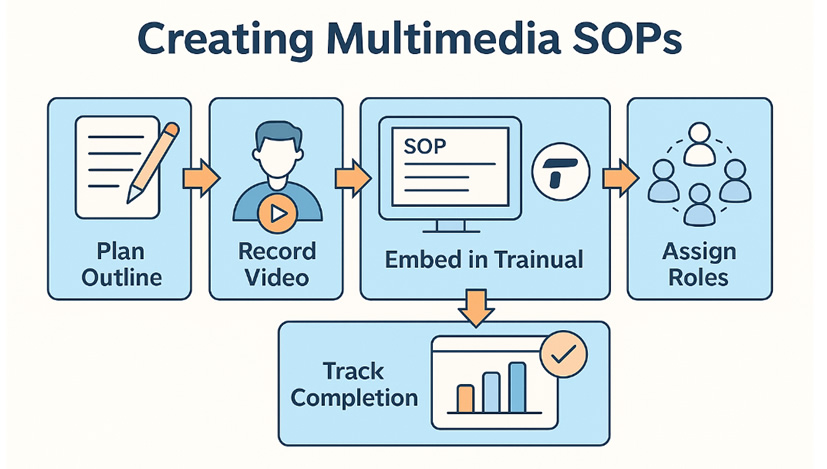
Follow this workflow to craft a polished video SOP that blends narrative, on-screen actions, and interactive checkpoints:
1. Plan Your SOP Outline
- Define the Objective: e.g., “Submit an expense report in X tool.”
- List Key Steps: Break down the process into 5–8 discrete actions (open the app, select the form, upload receipts, etc.).
- Identify Visual Cues: Note points where highlighting cursors, zooming, or text overlays will clarify intent.
2. Record with Loom
- Use Screen + Cam Mode: Humanize the tutorial by showing your face in the corner—this builds connection.
- Keep Clips Short: Aim for 60–90 seconds per step to maintain engagement.
- Narrate Clearly: Speak slowly, describe each action, and restate key button names.
3. Edit and Annotate
- Trim Dead Space: Remove pauses and mistakes using Loom’s editor.
- Add Callouts: Highlight clicks, form fields, or warning messages with Loom’s drawing tools.
- Include Chapters: If the process is lengthy, split into multiple Loom recordings and label them as Part 1, Part 2, etc.
4. Embed in Trainual
- Create a New Topic: Title it clearly, e.g., “How to Submit an Expense Report.”
- Add Video Steps: For each recorded step, insert the Loom link.
- Complement with Text: Under each video, provide a 1–2-sentence summary and any quick-link buttons (e.g., “Open Expense Form”).
- Insert Quiz Questions: After critical videos, add a one-question quiz to reinforce learning (e.g., “Which menu do you click to add a receipt?”).
5. Publish and Assign
- Define Roles: Assign the Topic to Finance, HR, or All Employees as appropriate.
- Set Deadlines: Require completion within 3 days of hire or policy update.
- Automate Reminders: Trainual will send nudges to anyone who hasn’t completed their video SOP.
Measuring Impact & Optimizing Performance
To ensure your multimedia SOPs drive real results, track these key metrics in Trainual’s analytics dashboard:
- Completion Rates: Percentage of assigned users who finish each video step.
- Average Time to Completion: How long it takes from assignment to final quiz pass.
- Quiz Scores: Identify concepts that need clearer explanation or revision.
- Support Ticket Volume: Monitor if ticket submissions drop after SOP rollout.
- User Feedback: Leverage built-in “Was this helpful?” ratings to gather qualitative insights.
Use A/B testing by creating two versions—one text-only, one video-enhanced—and compare metrics over a 2-week period. Iterate on videos that underperform by shortening, adding callouts, or clarifying narration.
Real-World Use Cases and Best Practices
- Customer Support Playbook: Record “How to Escalate a Ticket” with live screen demos of the CRM, reducing response errors by 40%.
- Sales Demo Templates: Embed Loom snippets showcasing critical features to ensure sales reps present consistently.
- HR Policy Acknowledgment: Use video intros for policies like GDPR, then require e-signature via Trainual’s e-signature step.
- IT Onboarding: Combine videos for VPN setup, email configuration, and security training—comprehensive but broken into bite-sized modules.
“Since switching to video SOPs, our support team reports 50% fewer clarifying questions—and new hires ramp up twice as fast.”
— Anonymous HR Manager, SaaS Company
Frequently Asked Questions (FAQ)
1. What is Trainual and how does it differ from traditional SOP tools?
Trainual is an all-in-one SOP and onboarding platform that combines process documentation, interactive training, and compliance tracking in a single cloud-based workspace. Unlike static document repositories (Word, PDF, Google Drive), Trainual embeds multimedia (video, quizzes, e-signatures) and enforces version control so that every user sees up-to-date procedures.
2. How do I integrate Loom with Trainual for video SOPs?
Within your Trainual dashboard, navigate to Settings → Integrations, find Loom, click Connect, and authorize the app. Once linked, any Loom recording URL you paste into a Trainual step auto-embeds as an in-line video player, complete with playback controls and transcripts.
3. What is the optimal length and structure for a video SOP?
Keep each clip between 60 and 90 seconds, focusing on one discrete action or decision point per video. Structure your SOPs with:
- Introduction: One-sentence summary of the objective.
- Step-by-Step Demo: Screen + optional camera overlay, with clear narration.
- Callouts/Annotations: Highlight clicks, menu paths, form fields.
- Quiz Checkpoint: One or two questions to reinforce key details.
4. Can I track who watched each video and passed the quiz?
Yes. Trainual’s reporting dashboard shows:
- Completion Rates: % of assignees who viewed each video step.
- Quiz Scores: Individual results and average across the team.
- Time to Completion: How long it took from assignment to passing the quiz.
These metrics help you identify knowledge gaps and follow up with targeted coaching.
5. What types of HR processes benefit most from multimedia SOPs?
Common high-impact use cases include:
- Expense Reporting & Reimbursements
- New Hire IT Setup (VPN, Email, Access Rights)
- Compliance Training (GDPR, HIPAA, Safety Protocols)
- Sales Demo and CRM Workflows
- Customer Support Escalation Paths
6. Is there a recommended quiz frequency to avoid “quiz fatigue”?
To balance reinforcement with engagement, insert a quiz after every 2–3 videos, or after videos covering critical compliance steps. Use one-question quizzes for simple processes, up to three questions for complex workflows.
7. How does Trainual handle version updates in video SOPs?
When a SOP changes, you can record a new Loom video or re-record only the affected segment. Simply replace the embedded link in Trainual—version control ensures that old links stop displaying and everyone immediately sees the updated tutorial.
8. Can external contractors and partners access these multimedia SOPs?
Yes. Trainual allows you to invite external users with read-only permissions. They can view embedded Loom videos and complete assigned steps but cannot edit your playbooks or access internal admin settings.
9. What security measures protect my video SOP content?
- Data Encryption: All content is encrypted in transit (TLS) and at rest.
- SSO & Access Controls: Integrate with Okta or Azure AD to enforce two-factor authentication and role-based access.
- Audit Logs: Track who viewed, edited, or signed off on any SOP step or quiz.
10. How do I measure ROI on multimedia SOPs?
Calculate ROI by comparing:
- Reduction in Support Tickets: Track pre- and post-implementation ticket volumes.
- Time Saved in 1:1 Training: Estimate hours new hires previously spent in live walkthroughs.
- Ramp-Up Speed: Measure weeks to full productivity before vs. after.
- Compliance Rates: Monitor mandatory policy completion percentages.
Conclusion & Next Steps
Transforming static SOPs into multimedia, interactive experiences removes confusion, accelerates onboarding, and scales knowledge sharing across any size team. By leveraging the seamless Trainual + Loom integration, you’ll empower new employees to learn visually, retain information longer, and hit productivity goals from day one.
Ready to modernize your SOPs and supercharge remote onboarding?
➡️ Discover Trainual on HRYP.com: Trainual – SOP and Onboarding Software for Small Businesses and Remote Teams
➡️ Start your 7-day free trial at trainual.com today—no credit card required.
Get Your HR Brand Featured on HRYP
Reach HR and business technology audiences with sponsored editorial coverage, vendor visibility and managed launch campaigns built for HR tech, SaaS and AI brands.
Sponsored editorial features from $170, with managed visibility and launch packages available.
