


What Is the Gusto Payroll Certification?
The Gusto Payroll Certification is a professional credential designed to validate your understanding of Gusto’s payroll system. Whether you’re an HR administrator, accountant, or small business owner, passing this certification proves your ability to run payroll, manage taxes, handle compliance, and navigate Gusto’s dashboard with confidence.
Many employers and clients prefer certified professionals as it signals expertise in managing payroll accurately and efficiently using the Gusto platform.
Who Is the Gusto Payroll Certification For?
The Gusto Payroll Certification is ideal for:
- HR professionals looking to expand their technical payroll knowledge
- Accountants and bookkeepers who support small businesses using Gusto
- Freelancers or consultants offering outsourced payroll services
- Small business owners managing payroll in-house and wanting to stay compliant
- Job seekers wanting to stand out on resumes or LinkedIn with verified platform skills
Whether you’re just starting in HR or already managing payroll clients, this certification helps validate your understanding of how to use Gusto effectively — a skill that’s increasingly valued in today’s digital-first workplace.
How to Register for the Gusto Payroll Certification
Getting started with the Gusto Payroll Certification is quick and entirely online. Here’s a step-by-step guide to help you through the registration and preparation process:
📝 Step 1: Create or Log In to Your Gusto Account
To access the certification program, you need to have an active Gusto account.
- If you’re already a Gusto user (admin, accountant, or partner), simply log in at gusto.com.
- If you’re new, you can create a free partner account through Gusto’s Partner Program — ideal for bookkeepers and accountants.
Once logged in:
- Head to the main dashboard and click on your profile menu.
- Look for the “Gusto Learn” or “Training & Resources” section.
- You’ll find various training modules, including the Payroll Certification path.
🔎 Pro tip: You can also access the program directly via gusto.com/partners/training
🎓 Step 3: Enroll in the Payroll Certification Course
- Click on the Payroll Certification course tile.
- Review the overview, learning objectives, and estimated time to complete.
- Click “Enroll Now” to begin the course.
📖 Step 4: Complete the Training Modules
The course is self-paced and includes:
- Interactive lessons
- Short quizzes after each module
- Real-world payroll scenarios
Topics include:
- Payroll tax calculations
- Employee classifications (W-2 vs 1099)
- Filing forms like W-2, 940, 941
- How to use features like Autopilot, benefits integration, and pay schedules
- PTO and compliance best practices
✅ Step 5: Take the Certification Quiz
- Once all modules are completed, you can access the final multiple-choice quiz.
- There’s no time limit.
- You must score at least 80% to pass.
If you don’t pass the first time, no worries — you can retake the quiz immediately and as many times as needed.
📄 Step 6: Download Your Certificate
- Upon passing, you’ll receive a digital certificate.
- You can download it as a PDF or add it directly to your LinkedIn profile under Certifications.
🏆 Getting certified not only strengthens your Gusto expertise but also boosts your professional profile if you offer payroll or HR services.
Practice Questions from the Gusto Quiz (2025 Edition)
| Question | Answer | Explanation |
|---|---|---|
| What is Form W-2 used for? | Employee tax reporting | Gusto files this form annually for each employee. |
| What does Gusto’s Autopilot feature do? | Runs payroll automatically | It ensures recurring payroll runs on time every cycle. |
| When should PTO be paid out to employees? | Upon termination | As per company policy or state law requirements. |
| What is Gusto’s default payroll schedule? | Biweekly | But this can be customized in settings. |
| Which tax form reports federal unemployment taxes? | Form 940 | Filed annually by Gusto on behalf of employers. |
Tips to Pass the Gusto Payroll Certification Quiz
Passing the Gusto Payroll Certification Quiz is absolutely achievable — especially with the right preparation. While the course is designed for beginners, some questions may require a solid understanding of U.S. payroll concepts and the Gusto platform itself. Here are expert tips to help you succeed on your first attempt:
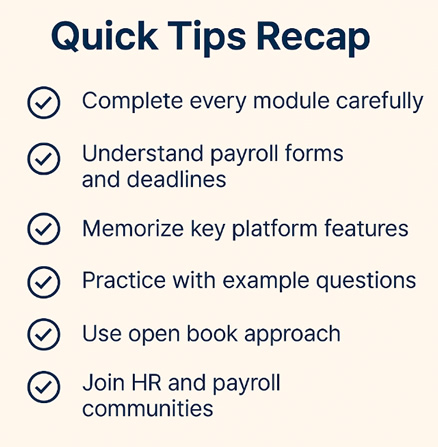
1. Complete Every Training Module Carefully
Don’t skip ahead. Each module contains:
- Platform-specific features explained in detail
- Real-world payroll examples
- Key terminology (like gross pay, tax withholdings, and PTO policies)
Take notes or screenshots as you go — they can be invaluable during the quiz.
2. Understand Payroll Forms and Deadlines
The quiz often includes questions about federal tax forms and when they must be filed:
- W-2: For reporting employee wages and taxes withheld
- W-4: Employee’s withholding certificate
- Form 940: Annual federal unemployment tax return
- Form 941: Quarterly payroll tax return
Know which forms Gusto automatically files and how you can access them in your dashboard.
3. Memorize Key Features of the Gusto Platform
Expect quiz questions like:
- “What does Autopilot do?”
- “Where can you adjust pay schedules?”
- “How does Gusto handle offboarding and PTO payouts?”
Familiarize yourself with:
- Autopilot payroll
- Tax document access
- Employee classifications (W-2 vs 1099)
- Onboarding and termination procedures
4. Practice With Example Questions
Use our Practice Questions from the Gusto Quiz (2025 Edition) to simulate real test items. Focus on:
- Multiple-choice logic
- Distinguishing between similar-sounding answers
- Applying concepts in context (e.g., PTO payout timing based on policy)
5. Don’t Rush — Use the Open Book Approach
There’s no time limit for the quiz. This means you can:
- Go back to training modules while taking the test
- Search within your Gusto account dashboard for answers
- Pause and return to the quiz if needed
So take your time and double-check answers before submitting.
6. Join HR and Payroll Communities
You’re not alone! Consider joining:
- Gusto’s Partner Community
- LinkedIn groups for HR professionals
- Facebook groups like “Payroll Pros” or “HR Nation”
These communities often share tips, prep guides, and quiz feedback.
🎯 7. Use the Certification as a Career Asset
Once you pass:
- Add the certificate to your LinkedIn profile
- Mention it on your resume or HR services website
- Use it to stand out as a Gusto Partner, especially if you’re offering payroll to clients
Bonus – $100 Gusto Referral!
If you’re using this certification to start offering payroll services, why not get rewarded too?
👉 Sign up for Gusto and claim your $100 bonus here – Our verified partner link gives you instant access to Gusto’s all-in-one payroll platform with added perks!
Frequently Asked Questions
Is the Gusto certification quiz difficult?
It’s designed for beginners with basic payroll knowledge. If you follow the training modules, you’ll pass.
Can I retake the Gusto quiz if I fail?
Yes, there are no penalties for retaking it.
Is the certification free?
Yes, Gusto currently offers it for free to users and partners.
How long does it take to complete the course and quiz?
About 1-2 hours depending on your experience.
Is this certification recognized outside of Gusto?
While not an industry-wide license, it demonstrates verified platform-specific skills.
How are payroll taxes calculated when you run payroll with Gusto?
Gusto calculates payroll taxes automatically based on employee classification, location, salary, and benefits. It withholds federal income tax, Social Security, Medicare, and applicable state taxes—ensuring compliance.
Where can you view and edit pay schedules in Gusto?
You can view and update pay schedules under “Settings > Payroll > Pay Schedules.” Here you can set frequency (weekly, biweekly, etc.) and assign employees to schedules.
Which of the following is not an option for assigning employee types?
This typically refers to multiple-choice questions in the certification. A common incorrect answer could be “1099 employee with W-2 benefits”—which is a misclassification.
For what employee pay type does the FLSA require hours to be tracked?
Non-exempt employees. Gusto allows you to enter and approve hours manually or via time-tracking integrations.
Where can you access the payroll tax forms filed by Gusto on your behalf?
Go to “Reports > Tax Documents” in the dashboard. You’ll find W-2s, 1099s, 940s, 941s, etc.
When should unused PTO be paid out to an employee upon leaving?
Depending on state law and company policy, but best practice is to pay it out with the final paycheck. Gusto automates this during the offboarding process.
How can Gusto’s payroll on Autopilot® feature save you time?
Autopilot automatically runs payroll for salaried employees on a set schedule, saving time on routine tasks and reducing the risk of late runs.
Who files Form 940 for your clients?
Gusto files this form automatically for employers who use the platform, covering federal unemployment tax obligations.
Final Thoughts
If you’re diving into HR, accounting, or payroll management, Gusto’s certification is a powerful way to upskill and signal credibility. And with our $100 referral bonus, there’s never been a better time to get started!
%20+%20Practice%20Questions%20&%20Tips)